
Overview
In the Sandbox environment, you can trigger Report hits for testing purposes. This helps you see what a hit looks like for a specific type of Report.
Steps
To trigger an example Report hit:
-
In the dashboard, switch to the Sandbox environment.
-
Navigate to Reports > All Reports.
-
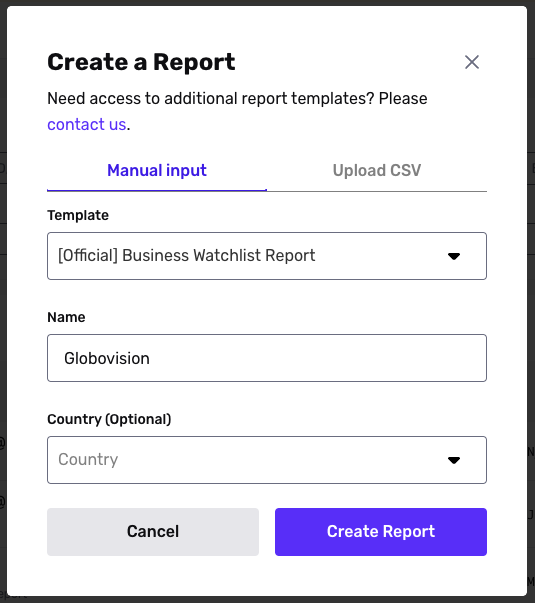
In the upper corner, click + Create report.
-
In the Manual input tab, select the Report Template you want to run.
-
Fill in values according to the Inputs for testing chart below.
-
Click Create Report.
Inputs for testing
Note, some Report types do not currently have test hits.
| Report type | Input | Result |
|---|---|---|
| Address Lookup | N/A | |
| Adverse Media | ”Jong Kim Un” or “Kim Jong Un” | Report hit |
| Business Adverse Media | “Globovision” | Report hit |
| Business Lookup | “Globovision” | 4100 Salzedo Street Coral Gables, FL 33146 |
| Business Social Media | N/A | Always responds with an entry for “Google” |
| Business Watchlist | “Globovision” | Report hit |
| Crypto Address Watchlist | 1Fz29BQp82pE3vXXcsZoMNQ3KSHfMzfMe3 | Report hit |
| Email Risk Report | alexanderjsample@example.com | Responds with a result with low reputation. All other emails return a result with high reputation |
| Phone Risk Report | +15005550006 (for low risk) or +14155555555 (for high risk) | Low risk or high risk response, depending on input |
| Politically Exposed Person (PEP) Report | ”Boris Johnson” | Report hit |
| Profile Report | N/A | Always responds with an entry for “Alexander Sample” |
| Social Media Report | N/A | Always responds with an entry for “Alexander Sample” |
| Watchlist Report | ”Jong Kim Un” or “Kim Jong Un” | Report hit |